Who Is Selling My Brand in Turkey? How to List Every Seller on Trendyol, Hepsiburada, Amazon.com.tr, n11 and Çiçeksepeti (2026)
Muhammet Çay · 6 September 2026 · 9 min read
Short answer: Search each marketplace for your brand name and put every listing's seller, price and image into a table. On Trendyol the seller identity is the merchantId parameter in the listing URL; on Hepsiburada the store name is printed on the search result itself; on Amazon.com.tr, n11 and Çiçeksepeti you learn the seller only by opening each listing. Then compare the list against your authorized-distributor list and against the price median for the same product — and repeat it, because a one-off list is out of date within a few weeks.
A brand that sells into Turkey through a distributor usually sees one thing: the distributor's monthly order. What it does not see is the other side of the market — the twenty or forty stores on Trendyol and Hepsiburada that sell the same products, some sourced from the distributor's own wholesale customers, some from parallel imports, some from nowhere you can trace. This guide is the method for making that side visible: where the seller identity is shown on each marketplace, how to record it so that store-name changes do not lose the trail, and what to compare the list against once you have it.
Where the blind spot comes from
Turkish marketplaces are built for shoppers, not for brand owners. The search page shows products; the seller is secondary information, placed differently on each platform and sometimes hidden behind a click. A brand owner abroad adds two more layers of blindness: the interface is in Turkish, and the volume of listings makes manual checking a weekly half-day job that nobody keeps up.
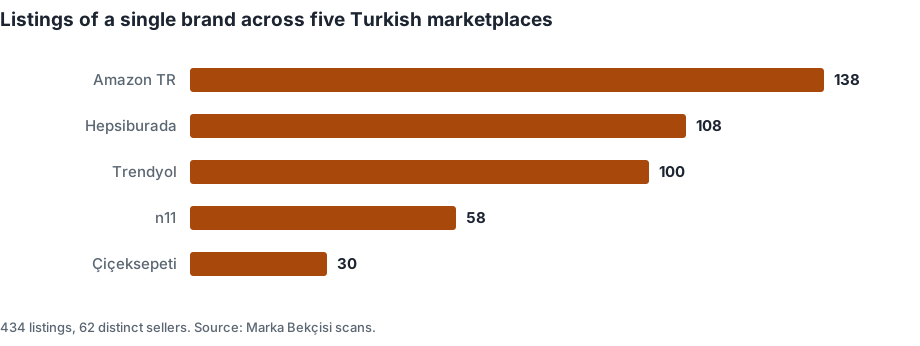
The result is a market you hear about only when your Turkish distributor complains about a price, or when a customer sends you a photo of a product you never shipped there.
Why you need the list before anything else
Every enforcement mechanism in Turkey starts from a listing, not from a brand:
- The complaint procedure under the Turkish e-commerce regulation requires the internet address of the listing as one of five mandatory elements (see Turkey's 48-hour takedown rule).
- Trendyol's trademark flow asks other sellers of the same product for a document; you need to know who they are to judge the result.
- The buy box on a shared product page goes to whichever seller wins on price, delivery and rating — you cannot see who is taking it without the list.
And the legal frame decides what the list is for. Under article 152 of the Industrial Property Code No. 6769, a genuine product placed on the market with your consent can be resold. So the list is not a hit list: most of the sellers on it are legitimate resellers you did not know about. The list tells you where your distribution leaks, which sellers to ask for their source, and — in the minority of cases — which listings are counterfeit or misuse your trademark.
Manual detection, marketplace by marketplace
Trendyol
Type the brand name into the search box and look at each listing's URL. Trendyol product URLs have this shape:
trendyol.com/brand-name/product-slug-p-1234567?merchantId=592566
The merchantId is the seller's identity; every listing with the same
value belongs to the same seller. This number lets you see how many listings a
seller runs under different product names. To learn the seller's name, you
have to open the listing — the search result carries only the identifier.
Run the search twice: once with the brand filter applied, once as plain text
without the filter. The second pass catches listings filed under another brand
but carrying your name in the title. For each row, note: product name, listing
URL, merchantId, price, image, badges. What to do with what you find on
Trendyol specifically is in
unauthorized sellers on Trendyol.
Hepsiburada
Hepsiburada is more generous: the store name is printed on the search result card. If several sellers share a product page, the "other sellers" list on the product page gives the full breakdown. Between the two, a single brand's Hepsiburada seller map can be built in half a day.
Know the enforcement difference before you turn findings into notices: on Hepsiburada, the rights holder files by notary or registered e-mail (KEP); the seller portal's internal messaging is closed to brand owners. See Hepsiburada IP complaints.
Amazon.com.tr
The search result shows no seller; you have to open the product page and read the "Sold by" field. Since many sellers can share one product page, the real list is behind the "all buying options" link. Price is not readable at search level either — on Amazon.com.tr you open every listing to learn both seller and price. If you are enrolled in Brand Registry, the tools change; see Amazon Turkey Brand Registry after approval.
n11
No seller on the search result; open the listing. n11 pages carry structured product data, so product name, brand and price are read reliably. n11 runs a separate Brand Protection Center for rights holders with its own membership.
Çiçeksepeti
Seller only on the listing page. Volumes are small, so manual scanning is easiest here; the difficulty is on the enforcement side, because Çiçeksepeti has no public portal for brand owners — notary or KEP only. The addresses are in Turkish marketplace IP contacts and KEP addresses.
What is visible on each marketplace
What determines the time a manual scan takes is not the number of listings but how much the search result page reveals:
| Marketplace | Seller on the search result | Price on the search result | To build the list |
|---|---|---|---|
| Trendyol | Identifier (merchantId) |
Yes | Open the listing for the name |
| Hepsiburada | Store name | Yes | Search page alone is enough |
| Amazon.com.tr | No | No | Open every listing |
| n11 | No | Yes | Open the listing for the seller |
| Çiçeksepeti | No | Yes | Open the listing for the seller |
Two marketplaces yield a list in an afternoon; on the other three the work grows with the listing count — a hundred listings means a hundred tabs.
The buy box: who decides who sells on your page
The buy box is the mechanism that decides which seller the "Add to cart" button belongs to when several sellers share one product page. Trendyol and Amazon work similarly: a combination of price, delivery speed, seller rating and stock decides the winner.
For a brand owner the consequence is blunt: on your own product page, the sale can go to the seller who cuts price hardest, not to your dealer. The page is yours, the images are yours, the description is yours — the sale goes elsewhere. There is no way to "close" the buy box. What you can do is know who is listed on the page and use the marketplace's own mechanisms to sort out sellers who cannot show a source. Trendyol's documentation names, as a condition of buy-box eligibility, that the product be sourced from the trademark owner or an authorized seller — which makes the seller list directly useful.
Three things a manual scan misses
Listings beyond the first page. Single-listing stores in the long tail sit on page three and four.
Spelling variants. The brand name with or without a space, abbreviated, or buried inside a product name returns different results; one query gives one slice.
The same seller under different store names. Without merging five lists you cannot ask whether three stores are one operator.
The limit of manual detection
Scanning one brand across five marketplaces by hand takes between half a day and two days depending on the range. That is not the real problem. A one-off list is stale within a few weeks: a new seller appears, a removed listing returns under another account, the price distribution shifts.
| Method | Cost | Sustainability |
|---|---|---|
| Manual scan | Time | Works if done monthly; usually is not |
| Assign it to an employee | A slice of a salary | Abandoned within three months because of the monotony |
| Automated weekly scan | Monthly subscription | Catches change, builds an archive |
How automatic detection works
An automated scan reads the marketplaces' public search pages at regular intervals and stores each listing in a database. It does not log into any account; what it sees is what any visitor sees. Typical fields:
- listing URL, product name and image;
- seller identifier or seller name;
- price and, where present, discount;
- badges the marketplace publishes;
- first-seen and last-seen dates.
The last is the most valuable: first-seen date tells you how long a listing has been live and belongs in any notice file.
Detection rules
A raw list says nothing on its own. It becomes meaningful through comparison:
- Matching against your authorized-dealer list. A seller not on the list is a record to review.
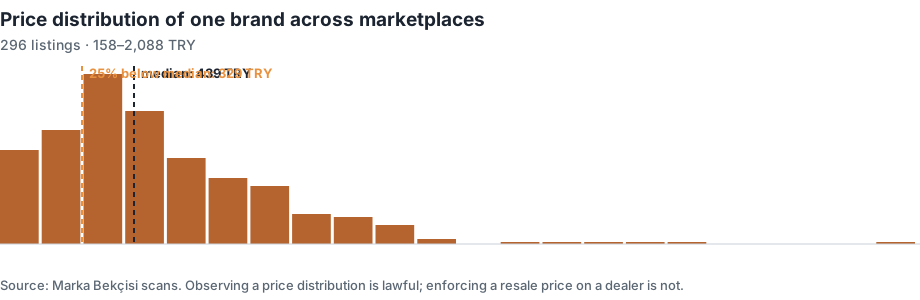
- Price distribution. Listings that deviate sharply from the median for the same product are flagged.
- Image reuse. Your official product photograph repeated as-is across different sellers' listings raises the question of image licence.
- Brand name in the title. A listing filed under another brand but carrying your name in the title may be capturing your search traffic.
All four produce candidates, not verdicts. Every record needs a human review; an automated system declaring "this is an infringement" is technically wrong and legally risky — the declaration of responsibility in a Turkish complaint is signed by a person.
Not a list but a record of change
The real output of monitoring is not the list; it is the difference between two scans. A weekly record answers: which seller appeared for the first time this week, which listing disappeared, how many listings dropped clearly below the median, and did a listing you had closed come back under a new store name? The last cannot be seen in a one-off scan; it shows up only if an archive is kept.
We automate this loop: five Turkish marketplaces scanned weekly, sellers grouped, prices compared to the median, findings labelled as candidates for review, and reports delivered in English. A free initial scan shows you your brand's picture today; packages and prices are on the English landing page.
Frequently asked questions
Can I see every seller of my brand on Trendyol in one screen?
No. The search result shows the numerical merchantId in each listing's URL
but not the seller name; you open each listing for the name. Filtering by
brand also misses listings filed under another brand, so run a plain-text
search as well.
What is a merchantId and where do I find it?
It is Trendyol's seller identifier, visible as the merchantId parameter in a
listing's URL. All listings with the same value belong to the same seller, and
it does not change when the store is renamed.
How do I list the sellers of my brand on Amazon.com.tr?
Open each product page and read the "Sold by" field, then the "all buying options" link for the full list of sellers sharing that page. Neither seller nor price is visible at search level.
Is every listing without the Authorized Seller badge a problem?
No. The Trendyol badge depends on a document the seller uploads and Trendyol approves; no badge can mean no upload, a rejected document, or a brand that never set up the flow. Treat it as a candidate for review.
The same seller uses different names on different marketplaces. How do I match them?
Merge the lists by product overlap, pricing pattern and, where the marketplace shows it, the seller's public business details. Automated monitoring keeps the identifiers per marketplace and lets you link them manually once.
I found an unauthorized seller. Can I have the listing removed immediately?
Only if the case is counterfeit goods or trademark misuse. Under article 152 of Code No. 6769, a genuine product placed on the market with your consent can be resold; an unauthorized seller of genuine goods is a distribution problem, not a takedown case.
Does scanning break the marketplaces' rules?
The method reads the public search pages that any visitor sees, without logging in and without collecting sellers' personal data. Reports contain only public store names, identifiers and listing URLs.
How often should I scan?
Weekly. Sellers, listings and prices change on that timescale, and a monthly gap is long enough for a removed listing to return unnoticed.
How many sellers is normal?
There is no universal number. What matters is the share of sellers you can trace to your own distribution and the trend from week to week — a rising count of untraceable sellers is the signal, not the absolute figure.
Sources
- Industrial Property Code No. 6769 (Turkish) — Exhaustion of rights, article 152 — why an unauthorized seller of genuine goods is not a takedown case
- Regulation on Electronic Commerce Intermediary Service Providers and Electronic Commerce Service Providers (Turkish) — Official Gazette 29 December 2022, no. 32058 — the complaint procedure your list feeds into
- Turkish Patent and Trademark Office (TÜRKPATENT) — Trademark registration and search
- Hepsiburada — Application Process for Intellectual and Industrial Property Rights Infringement (Turkish) — Rights holders file by notary or KEP; opens in a normal browser only
Related guides
How Many Sellers Is Normal on Turkish Marketplaces? A 44-Brand Benchmark (2026)
We scanned 44 brands across five Turkish marketplaces: median 32.5 sellers, middle half 16-41, most fragmented 79. Compare your own number.
7 September 2026 · 13 minGrey Market and Parallel Imports in Turkey: Why Unauthorised Sellers Are Often Legal (2026)
A seller with no contract with you is usually not infringing. What exhaustion of rights under Turkish IP law means, and what actually removes them.
6 September 2026 · 9 minHepsiburada IP Complaints for Brand Owners: Notary or KEP Only, 48 Hours Down, 24 Hours Back (2026)
How a rights holder files an intellectual-property complaint on Hepsiburada: why the seller portal is closed to brand owners, the KEP address dmarket@hs02.kep.tr, the mandatory elements, the sample declaration templates, the 48-hour removal, the 24-hour republication, and the one-shot rule.